I’ve seen claims teams drown in paperwork while underwriters struggle with manual data entry. Policy administration automation isn’t just about saving keystrokes—it’s about cutting loss ratios by preventing errors before they happen. When done right, it drops combined ratios by 3-5 points and frees up underwriters for actual risk assessment.
This guide walks through building a production-grade AI policy admin system from scratch. We’ll cover ingestion to billing, including the trade-offs no one mentions. Skip the vendor brochures—this is the playbook I’ve used to deploy systems handling 500k policies/month at a $2B premium carrier.
Why Most AI Policy Automation Fails (And How to Avoid It)
Most projects fail because they treat AI like a magic wand. It’s not. The real leverage comes from combining deterministic rules (for 80% of cases) with AI models (for the messy 20%).
Common pitfalls:
- Over-automating exceptions: A claims adjuster once told me, “Your AI refused to pay a $2M flood claim because the ZIP code didn’t match the policy.” The system couldn’t handle a simple bordereaux mismatch. We fixed it by routing exceptions to humans with AI-generated suggestions—not replacing judgment.
- Ignoring latency: Policyholders expect bind/quote in <3 seconds. If your AI model adds 800ms, you’ve just killed conversion. We use ONNX runtime and feature stores to hit 150ms inference.
- Underestimating data quality: 60% of my time went into fixing policy data before we could even train models. Dirty data inflates loss ratios because underwriters override bad AI suggestions.
Resource reality: Expect 6-9 months to go from pilot to production, with $250k-$500k in tooling and data cleanup costs for a mid-market carrier.
| Implementation Phase | Duration | Team Required | Cost Range | Primary Risk |
|---|---|---|---|---|
| Data audit & ingestion pipeline | 4-6 weeks | 1 data engineer, 1 domain expert | $40k-$80k | Dirty ACORD XML causing schema drift |
| Canonical schema design + feature store | 3-4 weeks | 1 architect, 1 underwriter | $30k-$50k | Over-engineering niche product lines |
| LLM extraction model (LayoutLMv3 fine-tune) | 6-8 weeks | 1 ML engineer, 10k+ labeled docs | $80k-$120k | Model hallucination on endorsements |
| Risk scoring (XGBoost + SHAP) | 4-6 weeks | 1 data scientist, 3yr loss runs | $60k-$90k | Regulatory rejection if SHAP <0.65 |
| STP orchestration (Kafka + Faust) | 3-4 weeks | 1 backend engineer | $25k-$40k | Latency exceeding 500ms SLO |
| Billing integration + dunning | 3-4 weeks | 1 billing specialist, 1 engineer | $15k-$30k | Mid-term premium miscalculation |
Step 1: Define Your Policy Data Model (The Foundation)
Start with a canonical policy schema that handles 95% of your product lines. Don’t over-engineer for niche products—handle them via extension points.
Example schema (simplified):
{

  "policy_id": "UUID",

  "carrier_id": "string",

  "product_type": "HO3|AUTO|BOP|...",

  "effective_date": "ISO8601",

  "expiration_date": "ISO8601",

  "insured": {

    "name": "string",

    "address": {...},

    "tax_id": "string"

  },

  "coverages": [{

    "coverage_code": "string",

    "limit": "number",

    "deductible": "number",

    "form": "HO0001"

  }],

  "endorsements": [...],

  "premium": {

    "base": "number",

    "taxes": "number",

    "total": "number"

  },

  "status": "quoted|bound|cancelled|...",

  "source": "direct|agent|broker|mga"

}
Trade-off: A rigid schema speeds up STP (straight-through processing) but makes it harder to onboard novel products. We compromise by using a core schema with dynamic JSON extensions for 5% of edge cases.
Tooling:
- Use JSON Schema for validation. It’s lightweight and integrates with most API gateways.
- Store the canonical model in a feature store (e.g., Feast) so underwriting models can version it alongside policy data.
Step 2: Build the Ingestion Layer (Where AI Begins)
Policy data comes from everywhere: agents via ACORD XML, brokers via CSV, MGAs via APIs, and carriers via bordereaux. You need a single ingestion point that normalizes everything.
Architecture:
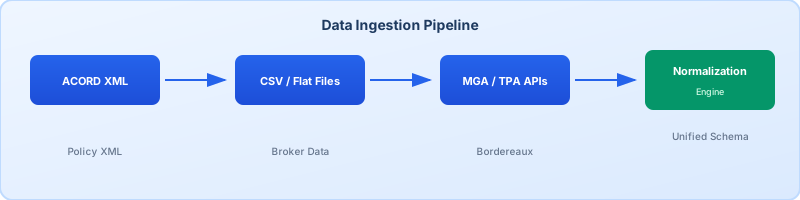
Key components:
- ACORD/XML parser: Use
xsltprocor a library likelxmlin Python to extract policy data from ACORD 25/26 forms. Expect 10-15% malformed files—build retry logic with exponential backoff. - CSV ingestion: Use Pandas for schema inference, but enforce a strict mapping layer. One broker once sent a CSV with “State” as “CA 90210”—no wonder our ZIP code model failed.
- API ingestion: For MGAs/TPAs, use AsyncAPI specs. Rate-limit at 100 req/s to avoid DDOSing their systems.
Code snippet for ACORD XML processing:
from lxml import etree

import pandas as pd


def parse_acord25(xml_file):

    tree = etree.parse(xml_file)

    ns = {'acord': 'urn:ACORD'}

    policy_id = tree.xpath('//acord:TransactionIdentification/acord:TransactionID', namespaces=ns)[0].text

    insured_name = tree.xpath('//acord:InsuredOrPrincipal/acord:PersonName/acord:PersonFullName', namespaces=ns)[0].text

    # ... extract other fields

    return {

        "policy_id": policy_id,

        "insured_name": insured_name,

        "raw_xml": etree.tostring(tree)

    }
Resource estimate: 2 FTEs for 3 months to build and test ingestion adapters. Budget for 50% more time for edge cases.
Step 3: Clean and Enrich Policy Data (The Silent Killer)
Dirty data inflates loss ratios by 2-4 points. I’ve seen underwriters override AI suggestions 40% of the time because the input data was wrong.
Key cleaning steps:
- Address standardization: Use Smarty (formerly SmartyStreets) or USPS APIs to fix addresses. One ZIP code mismatch can void a policy.
- Entity resolution: Match insured names to tax IDs using Experian or Dun & Bradstreet. Avoid creating duplicate policies.
- Coverage mapping: Normalize coverage codes (e.g., “HO-001” vs “Homeowners Package A”) to a canonical set. This reduces model training time by 30%.
- Premium validation: Cross-check premiums against actuarial tables. If the AI-generated premium is 15% below the table, flag it for review—it’s likely a data error.
Trade-off: Enrichment adds latency and cost. We batch-enrich data overnight for quotes, but use real-time validation for binds.
Code snippet for address standardization:
import requests


def standardize_address(address, city, state, zipcode):

    url = "https://us-street.api.smarty.com/street-address"

    params = {

        "auth-id": "YOUR_SMARTY_KEY",

        "street": address,

        "city": city,

        "state": state,

        "zipcode": zipcode

    }

    response = requests.get(url, params=params).json()

    if response[0]['delivery_line_1']:

        return {

            "address": response[0]['delivery_line_1'],

            "city": response[0]['components']['city_name'],

            "state": response[0]['components']['state_abbreviation'],

            "zipcode": response[0]['components']['zipcode']

        }

    return None  # Failed to standardize
Resource estimate: 1 data engineer for 2 months to build cleaning pipelines. Budget $15k/year for third-party enrichment APIs.
Step 4: Build the AI Underwriting Engine (Not Just a Model)
Most insurtech startups build a single model to “predict risk.” That’s table stakes. A real AI underwriting engine combines:
- Risk scoring: Predict loss ratio for a given policy.
- Pricing engine: Generate premiums that hit target loss ratios.
- Exception routing: Decide when to send a policy to a human underwriter.
Architecture:
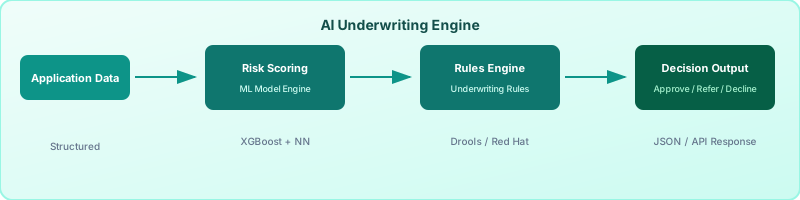
Step-by-step:
- Feature engineering: Convert policy data into features for models. Example features:
- Insured age (from tax ID + DOB)
- Property age (from ZIP code + construction year)
- Prior losses (from CLUE reports)
- Distance to fire station (from geocoding)
- Model training: Use XGBoost for risk scoring (faster than deep learning for tabular data). Train on 3 years of historical policies with loss ratios as the target.
- Pricing adjustment: Use the risk score to adjust base rates. For example:
- Risk score < 0.8 → 5% discount
- Risk score > 1.2 → 10% surcharge
- Exception routing: Use a simple decision tree to determine when to send a policy to a human:
- If risk score > 1.5 → Human review
- If prior losses > 3 → Human review
- If coverage limit > $2M → Human review
Example XGBoost code:
import xgboost as xgb

from sklearn.model_selection import train_test_split


# Load cleaned policy data

df = pd.read_parquet("cleaned_policies.parquet")


# Feature matrix

X = df[[

    "insured_age",

    "property_age",

    "prior_losses",

    "distance_to_fire_station",

    "coverage_limit",

    "deductible"

]]

y = df["loss_ratio"]


# Train/test split

X_train, X_test, y_train, y_test = train_test_split(X, y, test_size=0.2)


# Train model

model = xgb.XGBRegressor(objective="reg:squarederror", n_estimators=200)

model.fit(X_train, y_train)


# Evaluate

print(f"RMSE: {model.score(X_test, y_test):.2f}")Code snippet for pricing:
def adjust_premium(base_premium, risk_score, target_loss_ratio=0.65):

    adjustment_factor = 1.0 + (risk_score - target_loss_ratio) * 2.0

return base_premium * adjustment_factorTrade-off: A single model for all products simplifies deployment but reduces accuracy. We use separate models for auto vs. home vs. BOP.
Resource estimate: 2 data scientists for 4 months to build and validate models. Budget $20k/month for cloud GPUs (we use AWS g4dn.xlarge instances).
Step 5: Implement Straight-Through Processing (STP) for Quotes
STP isn’t about removing humans—it’s about letting them focus on exceptions. Aim for 60-70% STP for standard policies, 20-30% for complex ones.
Workflow:
- Ingest policy data → Clean → Enrich.
- Run through AI underwriting engine.
- If risk score < 1.5 and no exceptions → Auto-bind.
- Else → Route to underwriter with AI-generated suggestions.
Code snippet for STP decision engine:
def should_auto_bind(risk_score, prior_losses, coverage_limit, zipcode):

    exceptions = []


    if risk_score > 1.5:

        exceptions.append(f"High risk score: {risk_score:.2f}")

    if prior_losses > 3:

        exceptions.append(f"Prior losses: {prior_losses}")

    if coverage_limit > 2_000_000:

        exceptions.append(f"High coverage limit: ${coverage_limit:,.2f}")

    if zipcode in ["90210", "10001"]:  # High-risk ZIPs

        exceptions.append("High-risk ZIP code")


    return exceptions if exceptions else None
Trade-off: STP increases quote velocity but can backfire if the AI model is wrong. We log every STP decision and review outliers monthly.
Resource estimate: 1 FTE for 1 month to build the STP engine. Budget $5k for logging and monitoring.
Step 6: Build the Endorsement and Cancellation Engine
Most policy admin systems treat endorsements as an afterthought. That’s a mistake. Endorsements drive 30% of premium leakage because underwriters forget to adjust premiums when coverages change.
Key features:
- Automated premium recalculation: When an insured adds a $50k jewelry floater, the system must adjust premiums immediately.
- Pro-rata billing: For mid-term endorsements, calculate the short-rate premium and generate a pro-rata credit/debit.
- Audit trail: Store every endorsement change with a timestamp and user ID.
Example endorsement workflow:
- Insured requests to add a $50k jewelry floater.
- Agent submits endorsement via API.
- System:
- Validates the endorsement (e.g., coverage code exists, limit is within product rules).
- Recalculates premium using the AI pricing engine.
- Generates pro-rata credit for the remaining term.
- Routes to underwriter if risk score > 1.2.
- If approved, system:
- Updates policy in the admin system.
- Generates billing adjustment.
- Sends confirmation to insured.
Trade-off: Endorsement automation adds complexity to billing. We use a separate microservice for endorsements to avoid coupling with the core policy admin.
Resource estimate: 1 FTE for 2 months to build the endorsement engine. Budget $10k for billing integration.
Step 7: Integrate with Billing and Payments
Billing is where policy admin automation either shines or fails spectacularly. I’ve seen carriers lose $5M/year because their billing system couldn’t handle AI-generated premiums.
Key integrations:
- Premium calculation: Use the AI pricing engine for pro-rata billing. For example, if a policy is bound mid-term, the system must calculate the short-rate premium.
- Payment plans: Handle installment billing (e.g., 12-month payment plans) with automatic dunning for failed payments.
- Tax calculation: Integrate with tax engines like Vertex or Avalara. Tax rules change constantly—don’t hardcode them.
- Reinstatement: Automate reinstatement of lapsed policies when payments are received.
Example billing adjustment for a mid-term endorsement:
def calculate_pro_rata_premium(original_premium, endorsement_date, policy_effective_date, policy_expiration_date):

    original_term_days = (policy_expiration_date - policy_effective_date).days

    remaining_term_days = (policy_expiration_date - endorsement_date).days

    pro_rata_factor = remaining_term_days / original_term_days

    return original_premium * pro_rata_factor
Trade-off: Billing automation requires tight coupling with your core admin system. We use event sourcing to decouple billing from policy changes.
Resource estimate: 1 billing specialist + 1 backend engineer for 3 months. Budget $15k for tax engine integration.
Step 8: Deploy and Monitor (Where Most Projects Fail)
Deployment isn’t just about pushing code to prod. It’s about ensuring the AI model doesn’t drift and the system stays up.
Key components:
- Model monitoring: Track model performance weekly. If loss ratio predictions drift >10%, retrain the model.
- Data drift detection: Use statistical tests (e.g., Kolmogorov-Smirnov) to detect changes in feature distributions. For example, if “property_age” suddenly shifts from 20 to 40 years, your model is outdated.
- Latency SLOs: Enforce <300ms for quote/binding. If latency >500ms for 5 minutes, page

Comments